


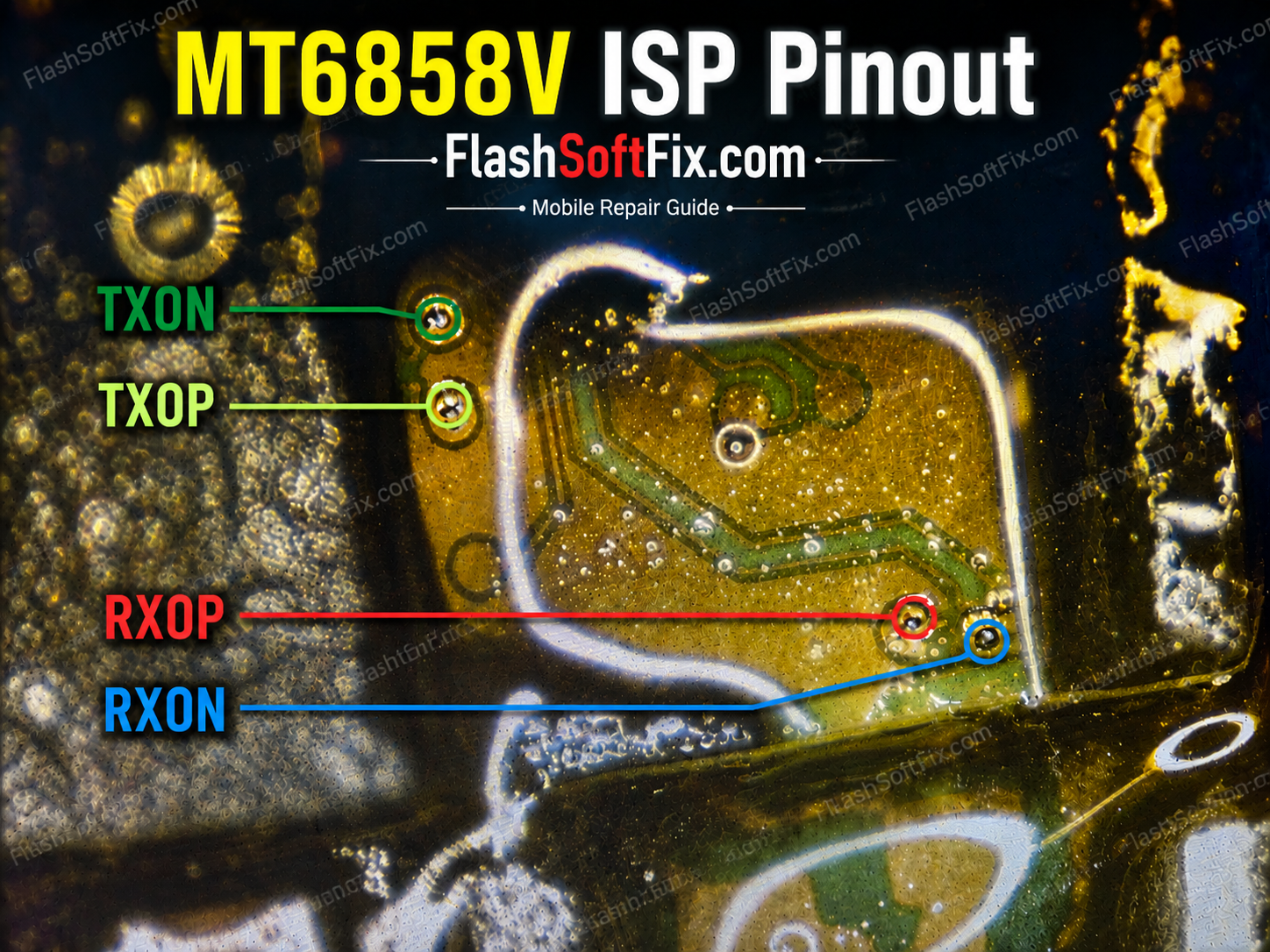
The MediaTek MT6858V is used in a range of modern Android smartphones. When a device has serious software, boot, or storage-related problems, direct access to the onboard UFS storage through ISP (In-System Programming) can be useful for professional mobile repair technicians.
In this guide, we will look at the MT6858V ISP pinout, the required UFS signals, connection precautions, and how technicians can use the pinout for troubleshooting and storage-related repair work.
What Is ISP?
ISP stands for In-System Programming.
ISP allows a technician to communicate directly with the storage IC while it is still installed on the motherboard.
This technique is commonly used by mobile repair technicians for diagnosing and servicing storage-related problems without removing the memory IC from the PCB.
For UFS devices, the connection method is different from traditional eMMC ISP because UFS uses a high-speed differential interface.
MT6858V ISP Pinout
The exact ISP test-point location depends on the phone model, motherboard revision, and UFS implementation.
The commonly required UFS signals include:
| Signal | Function |
|---|---|
| GND | Ground |
| VCC | UFS core supply |
| VCCQ | UFS I/O supply |
| REF_CLK | Reference clock |
| TX+ | Differential transmit |
| TX− | Differential transmit |
| RX+ | Differential receive |
| RX− | Differential receive |
| RST_N | UFS reset |
Important: The table above describes the relevant UFS signals; it is not a substitute for the exact board-specific test-point diagram.
MT6858V UFS ISP Test Points
Before connecting an ISP programmer, identify the UFS memory IC on the motherboard.
The test points may be located near the UFS IC or routed to accessible vias/test pads elsewhere on the PCB.
Use a microscope to inspect the board and verify the suspected points with a multimeter before making any connection.
Recommended identification process
- Disconnect the battery.
- Locate the UFS storage IC.
- Inspect the surrounding PCB under a microscope.
- Identify available test pads or vias.
- Trace the required signals.
- Verify connections with continuity testing.
- Check for accidental shorts.
- Connect the appropriate ISP/UFS programmer.
- Confirm the correct voltage configuration.
- Attempt communication only after all connections have been verified.
Why MT6858V ISP Is Useful
ISP can be useful when a smartphone has problems such as:
- Dead boot
- Bootloop
- Software corruption
- Storage communication failure
- Firmware-related problems
- UFS read/write problems
- Device not detected normally
- Advanced motherboard diagnosis
However, ISP should be considered a professional repair technique, and the correct procedure depends on the particular UFS IC and programmer.
MT6858V ISP Connection Precautions
Working with UFS requires extra care because the communication lines operate at high speed.
1. Verify the pinout
Never assume that all MT6858V boards use the same test-point arrangement.
Different smartphone models and PCB revisions can have completely different test-point locations.
2. Check voltage
Do not blindly apply external voltage to the motherboard.
Incorrect voltage can damage the UFS IC or other components connected to the storage power rails.
3. Avoid shorts
The ISP pads can be extremely small. A solder bridge between adjacent points can cause serious problems.
4. Keep connections clean
Use a microscope, fine wire and a controlled amount of flux when making ISP connections.
5. Verify before powering
After soldering, use a multimeter to check the connections and make sure there are no unintended shorts.
MT6858V ISP Tools
A professional technician may require:
- Microscope
- Fine-tip soldering iron
- Fine jumper wire
- Flux
- IPA
- Digital multimeter
- UFS-compatible programmer
- ISP/UFS adapter
- Stable power source
The exact programmer and connection method will depend on the UFS memory and the tool being used.
MT6858V ISP vs Normal Flashing
Normal firmware flashing communicates with the device through supported boot/software interfaces.
ISP is different because it provides access to the storage interface at the hardware level.
This makes ISP particularly useful for technicians dealing with devices where normal USB flashing or recovery methods are unavailable.
Important Note
Do not use an eMMC ISP pinout on a UFS motherboard.
Although both technologies are used for smartphone storage, their interfaces and communication methods are different.
Always verify:
- SoC/platform
- Motherboard model
- PCB revision
- UFS IC
- Programmer compatibility
- Voltage requirements
- ISP test-point mapping
before attempting the repair.
Devices Using the MediaTek MT6858V / Dimensity 7100
The MediaTek MT6858V / MT6858V/ZA is associated with the MediaTek Dimensity 7100 platform. This platform uses an octa-core CPU configuration with 4 × Cortex-A78 cores up to 2.4 GHz and 4 × Cortex-A55 cores up to 2.0 GHz.
For mobile repair technicians searching for the MT6858V ISP pinout, the following devices have been identified with this platform:
HONOR
- HONOR 600 Lite
- HONOR 600e
TECNO
- TECNO LK7k
Infinix
- Infinix X6896
ZTE nubia
- nubia Air Pro 5G
Important: The same CPU platform does not necessarily mean that every device uses the same motherboard layout or ISP test-point arrangement. Always verify the exact model and motherboard revision before using an MT6858V ISP pinout.
This MT6858V ISP reference is therefore intended as a hardware-repair reference, while the actual test-point location should always be confirmed against the specific motherboard being serviced.
Frequently Asked Questions
What is MT6858V ISP?
MT6858V ISP refers to accessing the device’s storage interface directly through accessible motherboard test points, typically for professional diagnosis or servicing.
Is MT6858V UFS or eMMC?
MT6858V-based devices can use UFS storage configurations, but the exact storage implementation depends on the particular device. Always identify the memory IC on the motherboard before selecting an ISP method.
Can ISP repair a dead MT6858V phone?
ISP can assist with diagnosis and certain storage-related servicing situations, but it does not automatically repair every dead device. The underlying hardware fault must first be identified.
Are MT6858V ISP points the same on every phone?
No. The test-point layout can vary between phone models and motherboard revisions.
Can I use eMMC ISP tools for MT6858V UFS?
UFS requires appropriate UFS-compatible hardware and connections. Do not assume an eMMC ISP setup will work with UFS.
Conclusion
The MT6858V ISP pinout is a valuable reference for professional mobile repair technicians working with MediaTek smartphones and UFS storage.
Correct identification of the motherboard, UFS IC and ISP test points is essential before connecting any programmer. Because test-point locations can vary between devices, technicians should always verify the actual PCB rather than relying solely on a generic platform-level diagram.
If you have the MT6858V motherboard or ISP pinout image, use that board-specific diagram as the primary reference before performing any hardware connection.

