


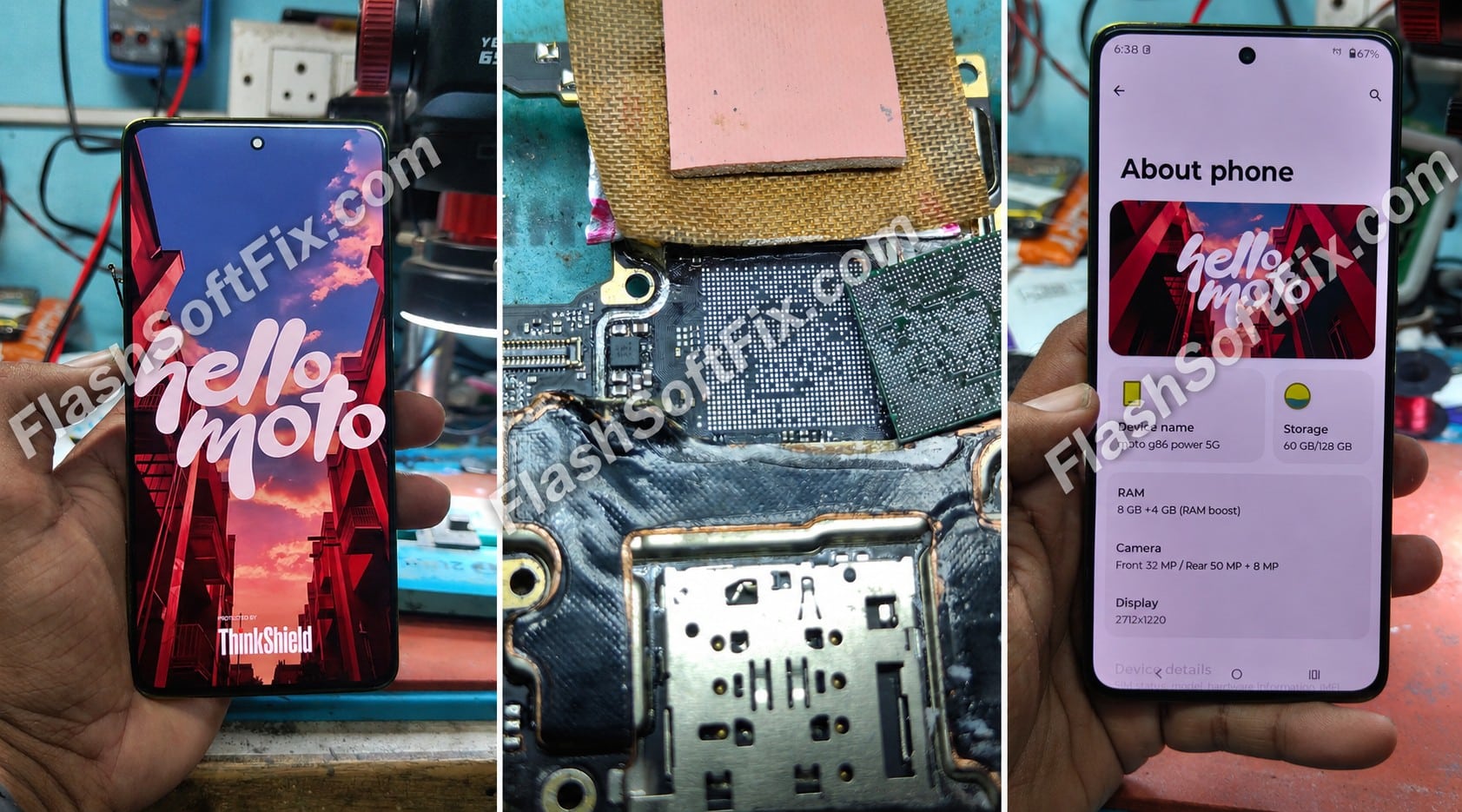
Moto G86 Power 5G Dead Repair – CPU Reball Fix
The Moto G86 Power 5G arrived for motherboard-level repair after developing a progressive fault. The phone initially started hanging and restarting intermittently, then became stuck at the Motorola logo, and finally went completely dead.
After checking the phone’s current consumption through USB and a DC power supply, a CPU contact-related problem was suspected based on the fault history and our repair experience.
The CPU was removed, reballed and refixed. After the CPU rework, the Moto G86 Power 5G powered on successfully.
Moto G86 Power 5G Fault Symptoms
The phone showed a progressive sequence of problems:
- Intermittent hanging
- Random restarting
- Motorola logo stuck
- Eventually completely dead
- No normal boot after pressing the power key
This progression was an important part of the diagnosis.
A phone that first develops intermittent hanging and restarting before becoming permanently dead can require detailed motherboard-level investigation rather than simply replacing the battery or charging port.
USB Current Consumption Test
The first useful observation came from testing the phone with a 6-port USB current meter.
The phone showed approximately:
0.4 A
This suggested that the motherboard was still showing some activity rather than behaving like a completely inactive board.
USB current readings alone cannot identify a faulty component, but they can provide useful information about the phone’s power and boot behavior.
DC Power Supply Test
The motherboard was then tested using a DC power supply.
When the power-on key was triggered, the current consumption was approximately:
0.054 A
After releasing the power key, the current returned to:
0 A
Current Behavior
| Test | Observed Current |
|---|---|
| 6-port USB meter | ~0.4 A |
| DC supply – power key triggered | ~0.054 A |
| DC supply – after key release | 0 A |
The board was responding to the power-on command but was not continuing into a normal boot sequence.
CPU Contact Problem Suspected
Based on the complete fault history and the observed current behavior, we suspected a CPU solder/contact issue.
The symptoms in this particular case were:
Hanging → Restarting → Logo Stuck → Dead
This type of progression can occur for several different motherboard faults, so CPU failure should not be assumed from symptoms alone.
Other possible causes can include:
- PMIC or power-rail problems
- RAM/storage problems
- Firmware or boot-related issues
- Clock/reset problems
- Board-level component failure
- CPU solder/contact problems
In this case, our experience with similar faults led us to proceed with CPU rework.
CPU Removal and Reballing
The CPU was carefully removed from the motherboard using appropriate board-level rework procedures.
The process included:
- Removing the CPU.
- Cleaning the CPU and motherboard pads.
- Inspecting the solder pads.
- Reballing the CPU.
- Checking the reballed CPU.
- Correctly aligning the CPU on the motherboard.
- Refixed the CPU.
- Allowing the board to cool before testing.
Proper alignment and controlled rework are important when working on modern smartphone motherboards.
Moto G86 Power 5G Power-On Test
After completing the CPU reball and refixing process, the motherboard was tested again.
The phone successfully started.
Repair Result
Moto G86 Power 5G — DEAD → CPU REBALL → POWER ON
The repair restored the phone to working condition.
Before and After Repair
Before
- Phone hanging intermittently
- Random restart
- Motorola logo stuck
- Eventually dead
- USB current approximately 0.4 A
- DC supply approximately 0.054 A during power-key trigger
- Current dropping to 0 A after releasing the key
Repair
CPU removed → reballed → refixed
After
Phone powered on successfully.
Important Note for Mobile Repair Technicians
A phone that is dead or stuck at the logo should not automatically be diagnosed as a CPU problem.
Before performing CPU rework, proper motherboard diagnosis should be carried out.
Depending on the device and fault, technicians may need to check:
- VBAT
- VPH/main power line
- Power rails
- PMIC behavior
- Short circuits
- Clock signals
- Reset signals
- RAM/storage communication
- Boot behavior
- USB current consumption
- DC power-supply current pattern
- Firmware/software condition
CPU reballing is a specialized motherboard repair procedure and should only be performed when the diagnosis supports CPU-related rework.
What We Learned From This Moto G86 Power 5G Repair
One of the most important lessons from this repair is that current consumption tells a story.
The phone was not simply showing zero activity. The USB meter showed approximately 0.4 A, while the DC supply showed approximately 0.054 A when the power key was triggered, followed by 0 A after the key was released.
Combined with the customer’s fault history — hanging, restarting, logo stuck and finally dead — these observations helped guide the repair toward the CPU area.
After CPU reballing and refixing, the phone powered on successfully.
Frequently Asked Questions
Why did the Moto G86 Power 5G become dead?
In this particular repair case, a CPU solder/contact issue was suspected based on the fault symptoms and current behavior. CPU reballing restored the phone.
Can hanging and restarting indicate a CPU problem?
It can, but these symptoms are not exclusive to CPU problems. Power, memory, storage, firmware and other motherboard faults can produce similar symptoms.
What was the USB current on this Moto G86 Power 5G?
The 6-port USB current meter showed approximately 0.4 A during testing.
What was the DC current consumption?
The DC power supply showed approximately 0.054 A when the power-on key was triggered, and the current returned to 0 A after releasing the key.
Did CPU reballing fix the phone?
Yes. After removing, reballing and refixing the CPU, the Moto G86 Power 5G powered on successfully.
Should every dead Moto G86 Power 5G receive a CPU reball?
No. Proper diagnosis should be performed first. A dead phone can have many possible causes, and CPU rework should not be performed without sufficient evidence.
Final Result
This Moto G86 Power 5G dead repair demonstrates the importance of combining fault history with motherboard current measurements.
The phone progressed from:
Hanging → Restarting → Logo Stuck → Dead
After checking USB and DC power-supply current and suspecting a CPU contact issue, we performed:
CPU Removal → Reballing → Refixing
The final result:
Moto G86 Power 5G — Back to Life.
FlashSoftFix
Real-world mobile motherboard repair cases, fault diagnosis, ISP pinouts, repair techniques and practical troubleshooting are documented by FlashSoftFix, powered by Flash Mobiles.
If you are a mobile repair technician, save this case as a reference for future Moto G86 Power 5G dead/no-power troubleshooting.

