


Introduction
A CMF Phone 2 Pro was received in completely dead condition. The phone showed no signs of powering on, so I started the diagnosis by checking its current consumption and main power circuits.
Using a 6-port USB charger/tester, there was no ampere consumption. I then connected the motherboard to a DC power supply without pressing the power key. The board immediately started consuming high current, which indicated a possible short circuit on one of the main power rails.
Further testing confirmed that the VPH circuit was fully shorted. Using a thermal camera, I located the source of the short and found a shorted capacitor in the audio section.
CMF Phone 2 Pro Received Dead
The customer brought the CMF Phone 2 Pro with a dead/no-power complaint.
Initial symptoms:
- Phone completely dead
- No display or boot response
- No normal charging response
- No current consumption through the USB tester
Since the phone was completely unresponsive, motherboard-level power-line diagnosis was required.
Step 1: Checking With a 6-Port USB Charger Tester
The first test was performed using a 6-port USB charger/tester.
After connecting the phone, there was no ampere consumption.
This confirmed that the phone was not showing a normal charging response. However, this test alone could not identify the exact fault, so I proceeded with DC power-supply testing.
Step 2: DC Power Supply Test
I connected the motherboard to a DC power supply without pressing the power-on key.
The result was immediately abnormal.
The motherboard started consuming high current automatically, even though the power key had not been pressed.
This is an important indication when diagnosing a dead motherboard. Such behavior can point toward a short circuit on a power rail that is active as soon as battery voltage is supplied.
Step 3: Checking the VPH Circuit
After observing the abnormal high-current consumption, I checked the main power circuits.
The VPH circuit was found to be fully shorted.
This explained why the board was drawing high current immediately after the DC supply was connected.
Diagnosis
VPH circuit short → high current consumption → motherboard unable to power on → phone completely dead
At this stage, the next task was to locate the exact component causing the VPH short.
Step 4: Locating the Short With a Thermal Camera
To locate the faulty component, I used a thermal camera while checking the shorted VPH circuit.
The thermal camera showed a localized hotspot on the motherboard.
This made it possible to identify the exact area where the short was occurring without randomly removing multiple components.
Shorted Capacitor Found in the Audio Section
The thermal inspection led to a capacitor located in the audio section of the motherboard.
The capacitor was found to be shorted.
The capacitor was the component responsible for pulling the VPH circuit to ground, creating the complete short circuit.
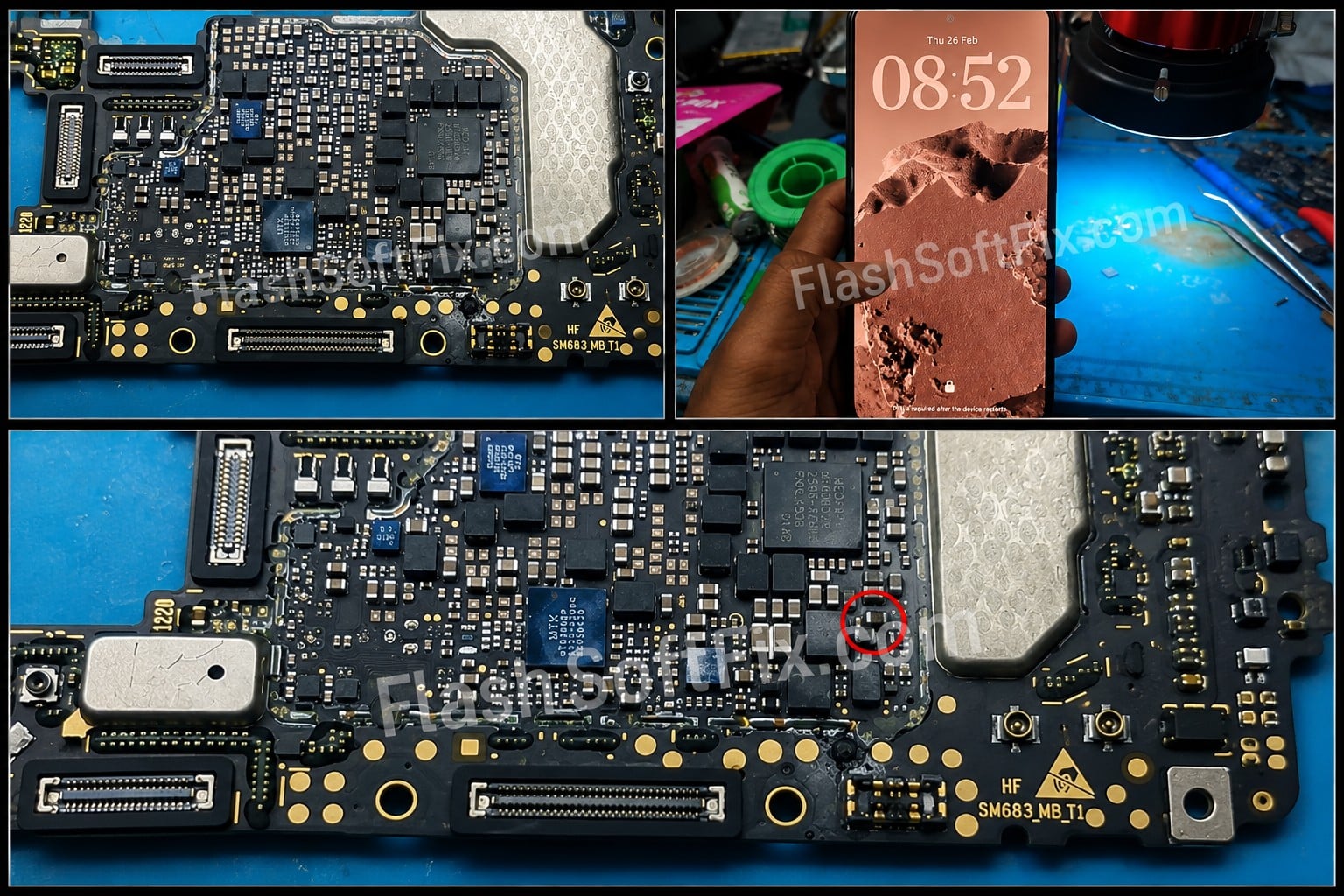
The capacitor marked in the motherboard image is the shorted capacitor.
Fault path
Shorted capacitor in audio section
↓
VPH circuit shorted
↓
High current from DC power supply
↓
No power-on operation
↓
CMF Phone 2 Pro dead
Motherboard Fault Location
Image caption: CMF Phone 2 Pro motherboard. The marked capacitor in the audio section was identified as the shorted component causing the VPH circuit short.
The marked capacitor is therefore the important component to check when diagnosing this particular VPH short condition.
Why Thermal Imaging Was Useful
When a power circuit is shorted, several capacitors and other components may be connected to the same power rail.
Finding the faulty component manually can take considerable time.
A thermal camera makes the process much easier because the component responsible for the short can often be identified by its localized heat generation when voltage is applied to the affected circuit.
In this case, the thermal camera helped locate the shorted capacitor in the audio section and narrow down the cause of the VPH short.
Complete Diagnosis Procedure
The troubleshooting process for this CMF Phone 2 Pro can be summarized as follows:
Phone received dead
↓
6-port USB charger/tester connected
↓
No ampere consumption
↓
DC power supply connected without pressing power key
↓
High current consumption
↓
VPH circuit checked
↓
VPH circuit found fully shorted
↓
Thermal camera inspection
↓
Hotspot detected in audio section
↓
Shorted capacitor identified
Conclusion
This CMF Phone 2 Pro was received in a completely dead condition. The initial USB test showed no ampere consumption, while the DC power-supply test revealed high current consumption even without pressing the power key.
Further testing confirmed a complete short circuit in the VPH circuit.
Using a thermal camera, the source of the short was traced to a capacitor in the audio section of the motherboard. The marked capacitor in the motherboard image is the shorted capacitor responsible for the VPH circuit short.
This repair demonstrates the importance of following a systematic motherboard diagnosis process rather than immediately suspecting major ICs.
Repair Case Summary
| Item | Diagnosis |
|---|---|
| Device | CMF Phone 2 Pro |
| Complaint | Dead / No Power |
| USB Tester | No ampere consumption |
| DC Supply | High current without pressing power key |
| Shorted Circuit | VPH circuit |
| Faulty Component | Shorted capacitor |
| Component Location | Audio section |
| Diagnostic Tool | Thermal camera |
| Root Cause | Shorted capacitor pulling the VPH circuit to ground |
FlashSoftFix.com — Real Mobile Motherboard Repair Case

